The goal of application performance management framework is to provide the end-users with the absolute best experience from beginning-to-end. While most APM tools are designed to proactively detect and troubleshoot performance issues to minimize its affect on users, its actual framework is among the most important feature when it comes to ensuring users have a highly successful experience throughout all even patterns.
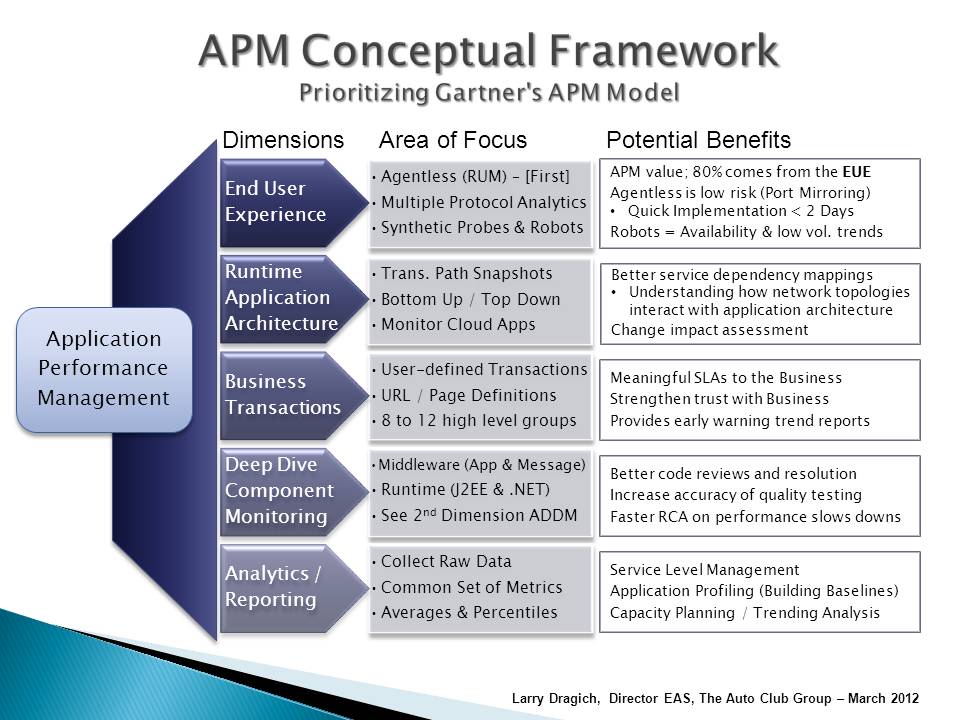
While there are many elements that come into play when it comes to APM framework and end-user experiences, the most important factors include:
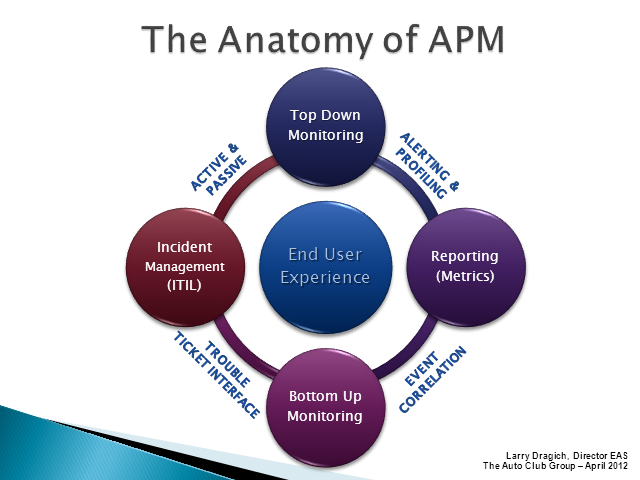
- Experience Monitoring – User experience monitoring through an APM framework is done without the use of an agent. It’s a network based tool that actually tracks user transactions through the physical system and reports on various metrics established within the APM framework. Generally, this type of reporting and monitoring is referenced as “passive monitoring.” However, there is another level of experience monitoring referred to as “active monitoring,” which utilizes synthetic, or test, transactions to continuously test the application and all its events and processes. This APM framework element tends to catch errors and performance issues before they alter the experience of users.
- Runtime Architecture – This form of APM framework utilizes a unique tool to fully understand what infrastructure elements are used for particular application components. Through the use of automated software, the application infrastructure is continually monitored to ensure all of its components operate to their highest levels of performance. Ultimately, this framework element determines all areas of applications run according to the standards you set forth.
- Transaction Monitoring – The transaction level of your APM framework is the level at which all application functions are broken down into categories, which allows IT managers and system administrators the opportunity to review specific segments within their entire business structure. In terms of end-user experiences, transaction monitoring is among the most important framework factors you must consider for smooth and succinct experiences.
- Deep Dive Monitoring for Problem Resolution – Deep dive component monitoring is the primary element of an APM framework capable of resolving problems and reporting component-specific metrics, such as the database and middleware. This element of APM framework is key to discovering specific application errors and tracking the errors to its root cause, which can be exhausting and time consuming without proper APM framework.
- Analytic Reporting Capabilities – Regardless of your applications, or their function, only select an APM framework capable of providing your business with highly detailed analytic reports based upon a set of metrics established by your network administrator.
Implementing each of these levels into your APM Framework isn’t necessary for every type of business. The number of levels you apply is based upon your specific performance risk threshold, which should be discussed in high detail with your IT manager/director.
A good example of using the APM Framework is Hoverwatch, specialized software for remote monitoring of children's or employees' activities on smartphones or computers. In the course of its development, the APM technology was utilized to the fullest and dramatically improved the quality of the service for end users.